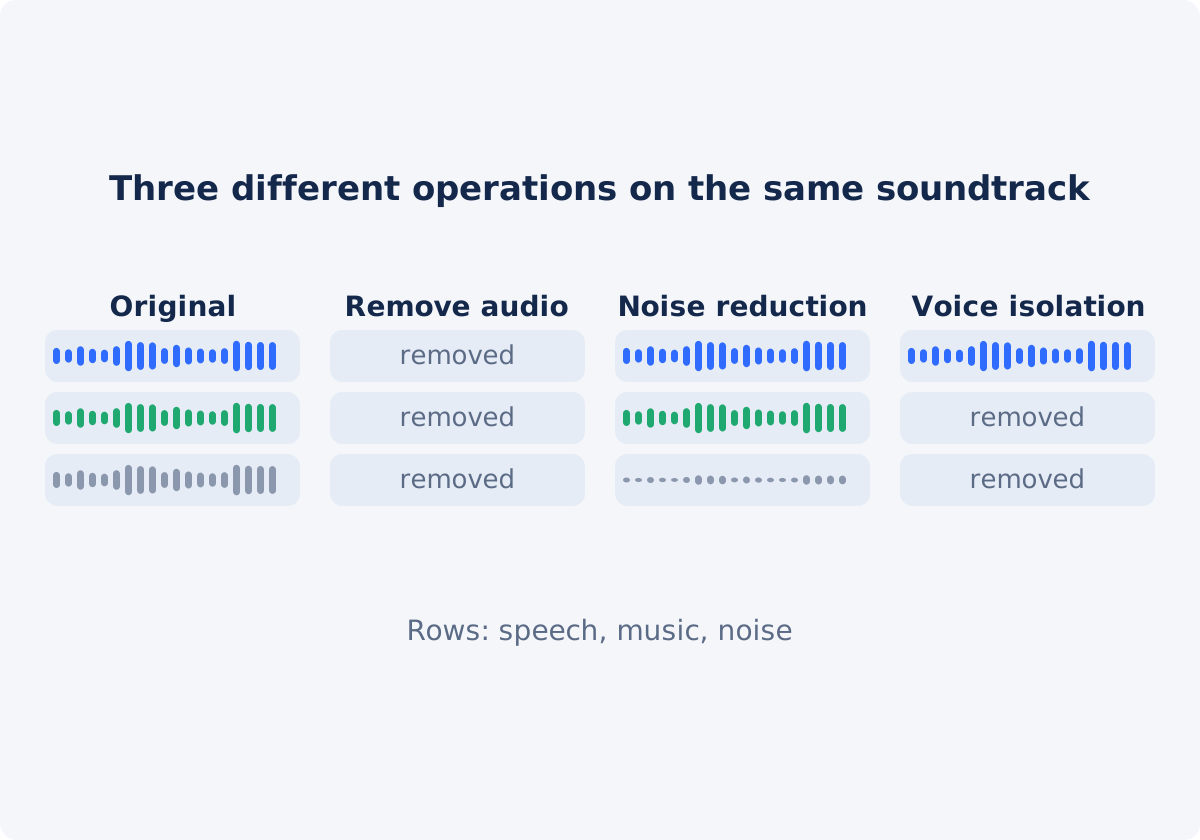
Remove audio: the whole soundtrack goes
A soundtrack, or audio track, is all the sound stored in a video file. It is a single mix. The voice, the music, the traffic, and the wind were recorded together, and they are stored together.
Removing audio produces a new video file with no audible soundtrack. It is a blunt operation, and a dependable one. There is nothing to tune, nothing can go subtly wrong, and the result is the same for every file: silence. In Deus.Video, the picture is normally copied as it is, without being compressed again, so removing the sound does not cost image quality. It differs from pressing mute in a player, which changes playback on one device and leaves the sound inside the file.
It is the right operation when the sound has no value, or has to go entirely: private conversation, background music you cannot publish, a clip destined for a silent display, or footage that will receive a new soundtrack.
Noise reduction: less noise, same content
Noise reduction is processing that attempts to lower unwanted sound, and preserve the wanted part. It works best on steady noise that has a consistent character: electrical hum, air conditioning, computer fans, tape hiss, a constant room tone. The software learns what the noise sounds like, and subtracts it.
It is a trade-off, not a switch. Applied gently, it makes a recording more comfortable to listen to. Applied heavily, it leaves artifacts: a watery, metallic, or "underwater" quality, and voices that sound thin. Irregular sounds, such as a door slamming, a dog barking, or someone else talking, are much harder to remove, because they do not have a fixed pattern.
The output still contains speech and music. It is a cleaner version of the same soundtrack.
Voice isolation: speech forward, everything else back
Voice isolation separates speech from the rest of the mix, or emphasizes it. Modern tools are trained to recognize the human voice, and suppress what is not voice, including music, crowds, and wind.
It is useful when the words matter and the environment was bad: an interview on a busy street, a talk recorded from the back of a room, a voice note with a TV on. The result keeps the speech, and reduces, or drops, the music and ambience.
Its limits are audible too. The voice can sound processed, breaths and word endings may be clipped, and a second person speaking nearby may be kept, or half-kept. It also removes ambience that may have been part of the scene.
Music removal and stem separation
A fourth task is often confused with the others: taking only the music out, and keeping the speech and the natural sound. That is stem separation, which splits a finished mix into parts, such as vocals, drums, bass, and other instruments. It is a specialist process, with its own tools and artifacts, and it is a different thing from noise reduction, which treats music as content, not as noise.
If commercial music is playing in the background of a clip you want to publish, and the speech also matters, stem separation or voice isolation is what you would look for. If the speech does not matter, removing all the audio is simpler, and leaves no residue.
Comparison table
| Operation | Keeps speech | Keeps music | Output | Best use |
|---|---|---|---|---|
| Remove audio | No | No | Silent video | Private sound, unusable music, silent displays, footage that will get a new soundtrack |
| Player mute | Yes, in the file | Yes, in the file | Unchanged file, silent on one device | Your own viewing only |
| Noise reduction | Yes | Yes | Same soundtrack, with less steady noise | Hum, hiss, fans, air conditioning, mild wind |
| Voice isolation | Yes | Mostly no | Speech with the background suppressed | Interviews and talks recorded in noisy places |
| Music removal (stem separation) | Yes | No | Speech and other sound, without the music | Background music that cannot be published, where the speech must stay |
| Lowering the volume | Yes, quieter | Yes, quieter | Same soundtrack at a lower level | Sound that is fine, and simply too loud |
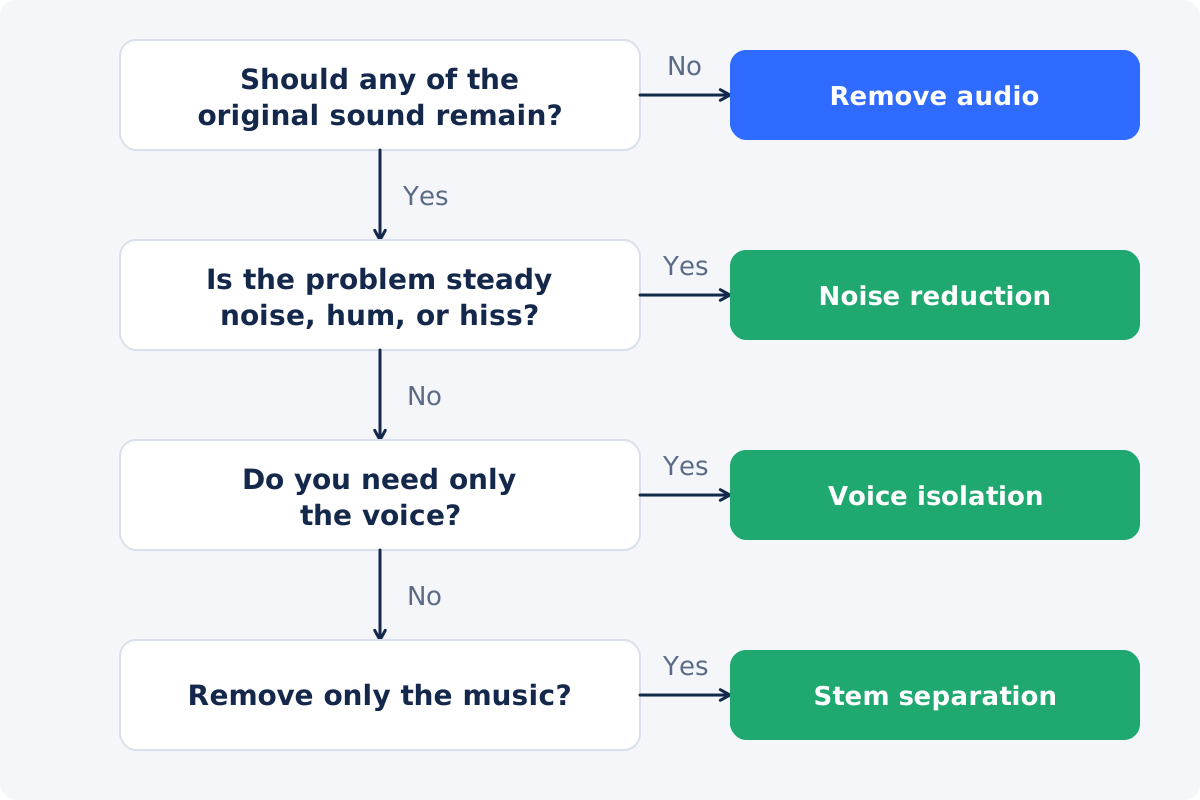
Decision tree
- Should any of the original sound remain? If not, remove the audio. Nothing else is needed.
- Is the problem a steady noise under otherwise good sound? Use noise reduction.
- Is the problem everything except the voice? Use voice isolation.
- Is the problem only the music? Use stem separation, or voice isolation if nothing but the speech matters.
- Is the problem one moment, such as a name or a phone ringing? Silence that section in an editor. The full-soundtrack tools are the wrong instrument.
- Is the recording beyond repair? Remove the audio, and replace it with a new voiceover, or with captions.
Five examples
Wind noise
An outdoor clip with wind rumble over someone talking. If the words matter, try noise reduction or voice isolation, and expect a partial improvement. If the clip is scenery, and the wind is simply unpleasant, remove the audio, and add music or leave it silent.
Private speech
A walkthrough video where a personal phone call is audible in the background. No cleanup tool is designed to delete one person's words reliably, and partial removal is a privacy risk. Remove the audio completely.
Copyrighted music
A café scene with a well-known song playing. If you need the conversation, look for stem separation or voice isolation, and check the result carefully for traces of the song. If you need only the picture, remove the audio.
Hum
An interview with a constant electrical hum. This is the ideal case for noise reduction. Removing the audio would throw the interview away.
Silent display clip
Footage for a store screen, a website header, or a trade show loop. Sound is never wanted. Remove the audio. The file also becomes a little lighter, although the exact change depends on processing.
Workflow for a completely silent result
When the answer is silence, you can remove audio from a video online with the Deus.Video tool.
- Decide whether to keep a copy of the sound. If you might need it, save it first as a separate file with Extract Audio from Video.
- Upload one video. Common inputs include MP4, MOV, AVI, WebM, and MKV.
- Click Remove audio from video. There are no options, because the operation has only one outcome.
- Wait for "Done! Download your result below," and click Download result.
- Play the file with the volume up to confirm that it is silent, and that the picture and the duration are as expected.
- Add what the video now lacks, if anything: new sound with Add Audio to Video, or captions.
The tool does not reduce noise, isolate voices, separate stems, lower the volume, or silence only a section. The original file is not modified.

When to look for a dedicated cleanup workflow
- The speech is the content: interviews, lessons, testimonials, meetings.
- The noise is steady, and the voice is reasonably clear underneath it.
- You need the natural sound of the place, without one intrusive element.
- The recording cannot be repeated.
Cleanup is done in audio software, or in services built for it. A practical route is to extract the soundtrack as a WAV file, process it in the cleanup tool, and then put the cleaned audio back. In the full Deus.Video editor, that means silencing the clip with the speaker icon next to its Volume control, and adding the cleaned file as a new audio track. Judge the result on headphones, and compare it with the original. Overprocessed audio can be more tiring than a little honest noise.

Conclusion
Remove audio, noise reduction, and voice isolation are three answers to three different questions: whether any sound should remain, whether the noise can be lowered, and whether only the voice is needed. Removal is total and reliable. The other two are selective, and they leave traces. Decide what has to survive, choose the operation that matches, and when nothing has to survive, make the video silent, and move on.
If the right result is silence, open the Remove Audio tool, process the clip, and play the download to confirm it.
Frequently asked questions
Can Remove Audio take out the background noise and keep my voice?
No. It removes the complete soundtrack, including the voice. Keeping speech while lowering noise is a job for noise reduction or voice isolation in dedicated audio software.
Can it remove only the music from my video?
No. Separating music from speech is stem separation, a different process. The tool's only result is a silent video.
What is the difference between noise reduction and voice isolation?
Noise reduction lowers a specific unwanted sound, and tries to leave everything else intact, including music and ambience. Voice isolation keeps the speech, and suppresses everything that is not speech. The first is gentler. The second is more aggressive, and more selective.
Is removing audio the same as setting the volume to zero?
For the listener, both give silence. The Remove Audio tool produces a processed file with no audible soundtrack. In the full editor, the same effect comes from muting the clip, or from setting its Volume to 0, before you export.
Will cleanup tools fix any bad recording?
No. They help with steady noise, and moderately poor conditions. Heavy distortion, a very distant voice, or overlapping speakers leave artifacts, or cannot be fixed. Sometimes re-recording, or replacing the sound with a voiceover and captions, is the better path.
Which one should I use to avoid a copyright claim on background music?
If you do not need the original sound, removing all of it is the most dependable choice. If you need the speech, separation tools may help, but traces of the music can remain, so review the result. Removing music does not resolve every rights question about a video.