What each operation does
Flip: reflection across an axis
A flip mirrors every frame across an axis, which is an imaginary straight line through the middle of the picture. Nothing turns. One side simply trades places with the other, and the frame keeps its width and height.
- Horizontal flip reflects across a vertical line. Left and right swap. This is the mirror image you see in a bathroom mirror, and it reverses text.
- Vertical flip reflects across a horizontal line. Top and bottom swap. The result looks like a reflection in water: upside down, and mirrored.
Rotate: turning around the center
A rotation turns the entire frame around its center point, called the rotation axis, by some angle. Every part of the picture keeps its position relative to every other part. Nothing is mirrored.
- 90° and 270° turn the frame a quarter turn one way or the other. Width and height trade places, so a horizontal video becomes vertical.
- 180° turns the frame upside down. The frame keeps its shape.
The five results, side by side
The easiest way to tell the operations apart is to watch what happens to a sign and an arrow in the corner of a frame.
- Horizontal flip: the sign moves to the other side, its letters are reversed, and the arrow points the opposite way.
- Vertical flip: the sign drops to the bottom, upside down, and the letters are reversed as well. Turning your head will not make them readable.
- Rotate 90°: the sign runs down the side of a now-vertical frame. Tilt your head, and it reads normally.
- Rotate 180°: the sign is upside down in the opposite corner. Turn the screen around, and it reads normally.
- Rotate 270°: like 90°, turned the other way.
That head-tilt test is the core of the difference. After a rotation, the picture is intact, only turned. After a single flip, it is a mirror image, and no amount of turning restores it.
Why horizontal plus vertical flip equals a 180° rotation
Apply both flips, and something interesting happens. The horizontal flip reverses the text. The vertical flip turns it upside down and reverses it again. Two reversals cancel out, so the text is readable once more, just upside down. That is exactly what a 180° rotation produces.
So "Both" in a flip tool and "180°" in a rotate tool give visually identical pictures. It is the only point where flipping and rotating meet. A single flip never equals any rotation, and no combination of flips produces a 90° or 270° turn.

Why a vertical flip alone does not fix an upside-down video
It is a natural guess: the video is upside down, so flip it vertically. The result does look upright at first glance. The sky is at the top again, and people stand on their feet.
But a vertical flip is a reflection, so the corrected-looking picture is now a mirror image. Text reads backward, a right-handed person appears left-handed, and cars drive on the other side of the road. You have traded one error for another.
Footage that was recorded with the camera held upside down has been turned 180°, not reflected. The matching fix is a 180° rotation, or the combination of both flips. A vertical flip by itself is the right correction only in the rare case where footage really was reflected top to bottom, for example by an optical setup with a mirror, or by an earlier editing mistake. It is mainly a creative tool.
Comparison table
| Operation | What changes | Text behavior | Best use |
|---|---|---|---|
| Horizontal flip | Left and right swap; frame shape unchanged | Reversed (mirror writing) | Unmirroring a mirrored file; changing screen direction; a mirror effect |
| Vertical flip | Top and bottom swap; frame shape unchanged | Upside down and reversed | Reflection effects; footage reflected top to bottom |
| Both flips | Same picture as a 180° turn | Upside down, readable when turned | Upside-down footage, as an alternative to rotating |
| Rotate 90° or 270° | Quarter turn; width and height trade places | Sideways, readable when you tilt your head | Video lying on its side |
| Rotate 180° | Half turn; frame shape unchanged | Upside down, readable when turned | Upside-down footage |
| Reverse (not a geometry change) | Order of frames in time | Unchanged | Making motion play backward |
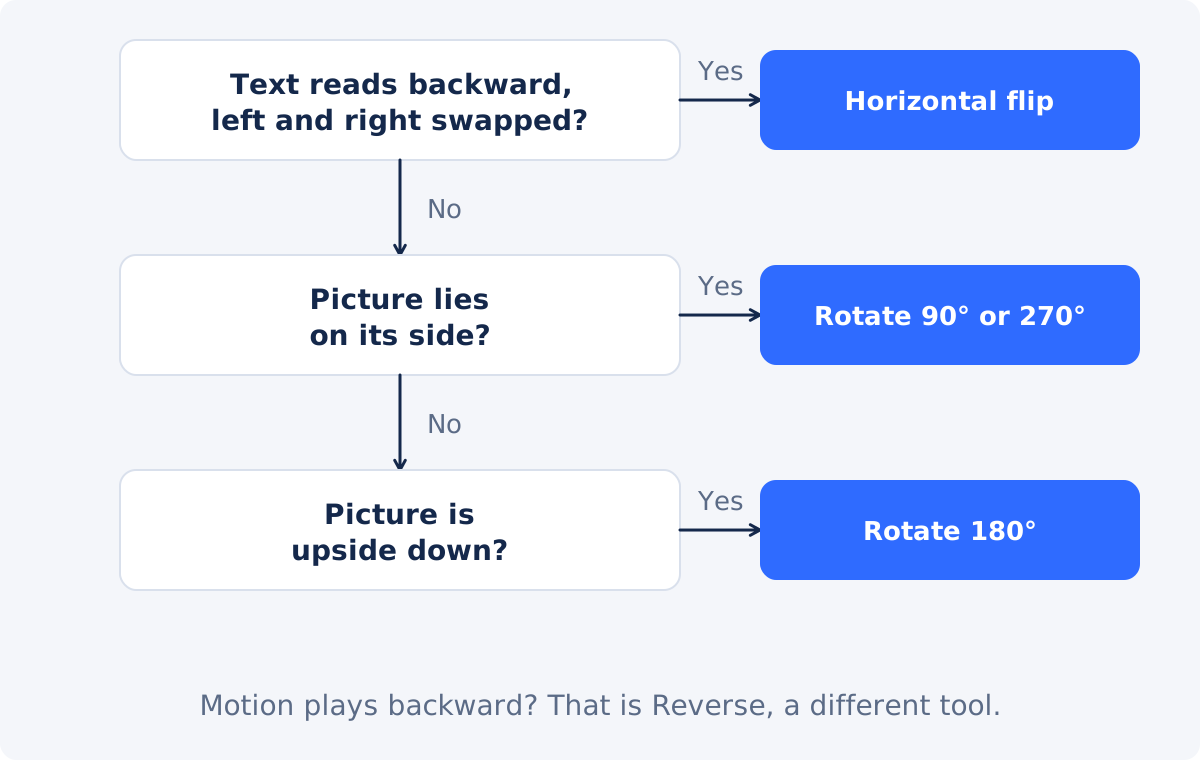
Decision tree: mirrored, sideways, or upside down?
- Pause on a frame with text, a logo, or a clock.
- Is the picture upright, but the text reads backward? The file is mirrored. Use a horizontal flip.
- Is the picture lying on its side? Rotate by 90° or 270°, whichever brings the top to the top.
- Is the picture upside down? Rotate by 180°, or apply both flips.
- Is it upright after your fix, but the text is now reversed? You used a single flip where a rotation was needed. Go back to the original and rotate it.
- Is it both turned and mirrored? Fix the rotation first, then check the text and flip horizontally if needed.
- Does the picture look right, but the action runs backward? That is a time problem, not a geometry problem. Neither flip nor rotate will help.
Workflows
Flipping in Deus.Video
Use the Flip Video tool to flip a video online.
- Upload the video. Common inputs include MP4, MOV, AVI, WebM, and MKV.
- Choose a quick preset: Original, Horizontal, Vertical, or Both. You can also use the separate Horizontal flip and Vertical flip toggles.
- Check the live preview. A label in its corner names the selected reflection.
- Play the clip and pause on text or other orientation clues.
- Click Flip Video. The button becomes active once at least one direction is selected.
- Download the processed result, or continue in the full editor.
The Flip Video tool does not rotate by 90° or 270°, and it does not reverse playback.

Rotating
For a sideways or upside-down recording, use Rotate Video, which turns the frame by 90°, 180°, 270°, or a custom angle. After a quarter turn, the frame's width and height are swapped, so check that the new shape suits where the video will be shown.
Combining operations
If a clip needs a turn and an unmirroring, each standalone step processes and re-encodes the video, which can reduce quality slightly each time. Re-encoding means compressing the video again when the new file is saved. For several changes at once, the full Deus.Video editor lets you set an element's angle, position, and other properties in one project and export once. There, the Angle field turns an element, and dragging a side handle across the opposite edge mirrors it.
Flip and rotate are not reverse
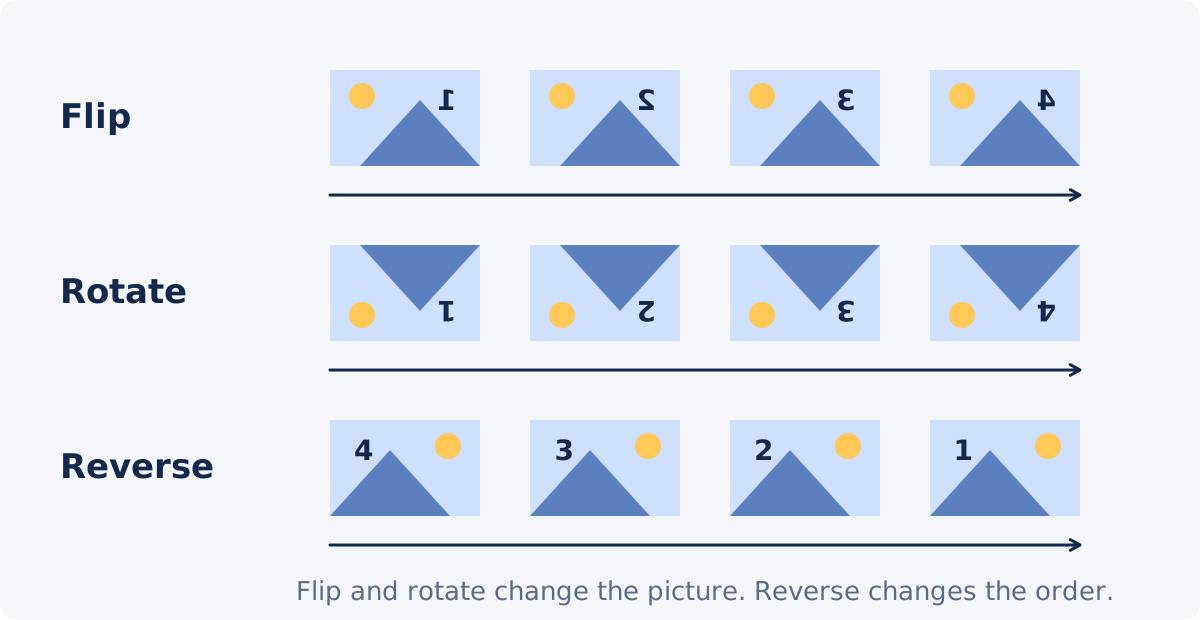
The words "reverse," "flip," and "mirror" get mixed up in everyday speech. In video tools they mean different things. Flip and rotate change the geometry of every frame and leave the order of frames alone. Reverse keeps every frame as it is and plays the frames from last to first, so a glass un-shatters and a diver rises out of the water. If that is what you want, Reverse Video is the tool.
Common mistakes
- Using a vertical flip on upside-down footage. It looks fixed until someone notices the mirrored text.
- Using a horizontal flip on a sideways video. The picture is still sideways, and now mirrored too.
- Fixing a preview instead of a file. Some apps and players show a mirrored or auto-rotated preview. Check the saved file in a regular player before changing anything.
- Judging by faces. Faces look plausible both ways. Use text, logos, clocks, and handedness.
- Forgetting that added captions flip too. A flip reflects everything in the picture, including burned-in titles.
- Stacking corrections. Flip, then rotate, then flip again, each as a separate export, costs quality. Work out the right operation first, and apply it once to the original.
- Ignoring the new frame shape. A 90° turn makes a horizontal video vertical.
Conclusion
Flip reflects, and rotate turns. A single flip always gives a mirror image with reversed text. A rotation never does. The two meet in one place only: both flips together equal a 180° turn. Diagnose with a frame that contains text, match mirrored footage with a horizontal flip and turned footage with a rotation, and apply the fix once to the original file.
If your diagnosis says "mirrored," you can mirror the video horizontally with Deus.Video and confirm in the preview that the text reads correctly.
Frequently asked questions
Is flipping a video the same as rotating it 180°?
Only when you flip in both directions. A horizontal flip alone, or a vertical flip alone, gives a mirror image, which no rotation can produce. Horizontal and vertical together give the same picture as a 180° rotation.
Why is the text backward after I fixed my upside-down video?
A vertical flip was used. It turns the picture upright by reflecting it, which also mirrors it. Go back to the original file and rotate it by 180°, or apply both flips.
Can I rotate a video by 90° with a flip tool?
No. No combination of horizontal and vertical flips produces a quarter turn. Use a rotate tool for sideways footage.
Does flipping or rotating change the video's dimensions?
Flips and a 180° rotation keep the frame's width and height. Rotations by 90° or 270° swap them, so a 1920 × 1080 video becomes 1080 × 1920.
Which one should I use for a selfie video with reversed text?
A horizontal flip, provided the saved file itself is mirrored. Check the file in a regular player first, since a mirrored preview does not always mean a mirrored file.
Do these operations affect the sound?
No. Flipping and rotating change the picture only. The audio keeps playing forward, in its original order. Reversing a video is the operation that concerns time.