Definitions
The words are used loosely in everyday speech, so here is what each means in this guide.
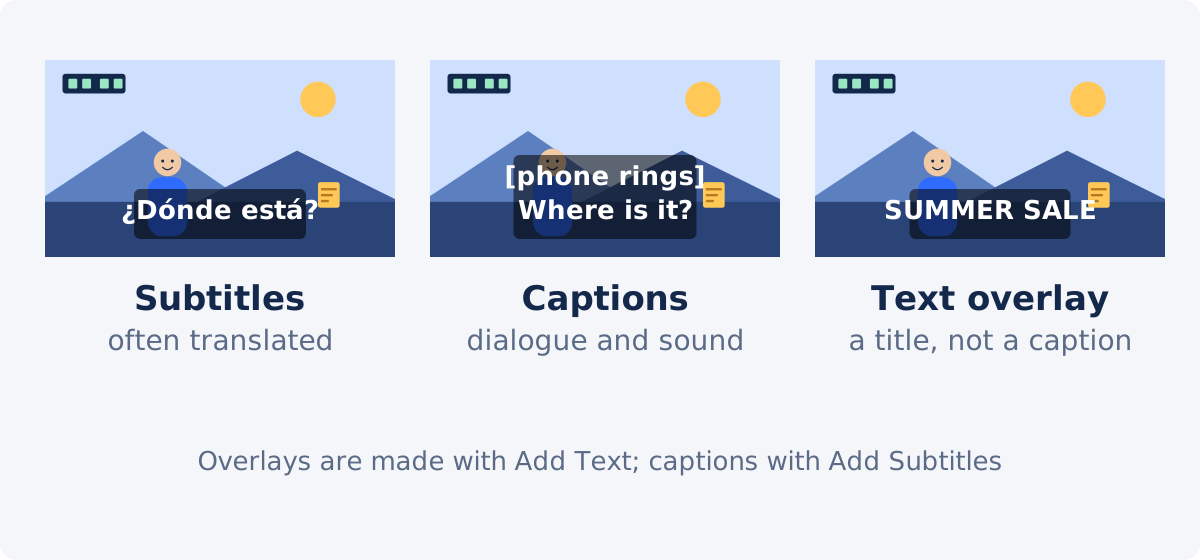
- Subtitles are text that shows what is spoken. In one common usage, especially in the US, subtitles assume the viewer can hear and are mainly a translation or a transcript of dialogue.
- Captions are text for viewers who cannot hear the audio, or are watching without sound. Captions include dialogue and also meaningful sounds, music, and speaker identification. In much of the world the word "subtitles" covers both, which is why the terms get mixed.
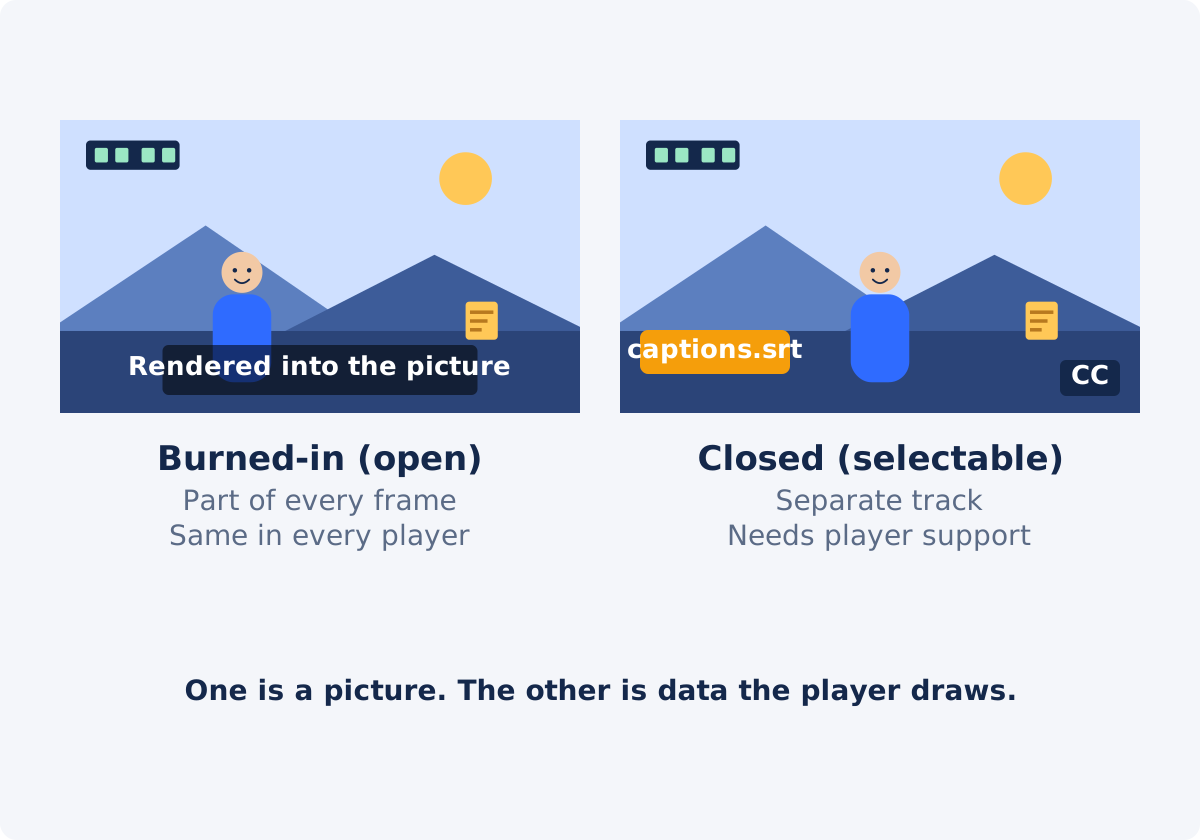
- Open captions, or burned-in subtitles, are captions or subtitles rendered permanently into the video picture. "Open" means always visible. "Hardcoded" is another word for the same thing.
- Closed captions, or selectable captions, are stored separately from the picture, as a track inside the file or a separate file such as SRT, and displayed by the player when the viewer turns them on. "Closed" means they can be closed, that is, hidden.
So "burned-in vs. closed" is a question of delivery, and "subtitles vs. captions" is a question of content. A burned-in file can carry captions with sound descriptions, and a closed track can carry translation-only subtitles.
Comparison
| Feature | Burned-in (open) | Closed captions |
|---|---|---|
| Where the text lives | In the picture, in every frame | In a separate track or file |
| Can the viewer hide it? | No | Yes |
| Works in every player? | Yes, it is just video | Only where the player supports the track |
| Multiple languages | One version per language, each a separate video | Several tracks on one video, where supported |
| Viewer can resize or restyle | No | Often, depending on the player |
| Text is searchable or readable by software | No, it is pixels | Yes |
| Fixing a typo later | Re-render the video | Edit the track |
| Behavior on muted autoplay feeds | Always visible | Depends on the platform's caption setting |
| Risk of being cropped or covered by a platform interface | Yes, if placed too low or at the edges | Platform positions its own captions |
| What Deus.Video's standalone tool produces | This | Not this; keep your SRT for platforms that accept a track |
Advantages and limitations
Burned-in
The advantage is certainty. The text shows wherever the video plays: a social feed on mute, a messaging app, a slide in a presentation, an embedded player without caption controls, a screen at an event. There is nothing for the viewer to enable and nothing for a platform to drop. The look is under your control and identical everywhere.
The limitations follow from the same fact. Viewers who do not want the text cannot remove it. One language means one video; a second language is a second file. A correction means processing the video again. And because the text is pixels, search engines and assistive software cannot read it, and the viewer cannot enlarge it.
Closed captions
The advantage is flexibility. One video can carry many languages, the viewer chooses whether and how to display them, and the text is data that can be searched, indexed, corrected, and read by assistive technology. Platforms that support captions well usually let viewers set size and contrast to their needs.
The limitation is dependency. Captions exist only where the player supports and shows them. A file passed through a tool that strips tracks arrives without them. A viewer who does not know to turn them on sees none. On some feeds, whether captions show on muted autoplay is a platform decision, not yours.
Accessibility and language
For viewers who are deaf or hard of hearing, captions with sound descriptions and speaker identification are the substance; the delivery method matters less, as long as the captions are actually visible where the person watches. Closed captions are usually the better fit for accessibility because they can be enlarged and restyled and are readable by assistive technology, but burned-in captions are better than none in places where a track would not be shown. Legal and platform requirements for captioning vary by country, sector, and context, change over time, and are outside this guide; check the current rules that apply to your situation rather than assuming one method satisfies them.
For language, closed captions scale: one video, several tracks. Burned-in text means one rendered video per language, which is practical for one or two languages and a burden beyond that. A common pattern is to burn in the primary language for feeds and keep translations as tracks on platforms that support them.
Platform and player dependency
Whether closed captions work is a property of the destination, not of the file. Before choosing, check the destination itself: does the player show a captions control, does the upload form accept a subtitle file, do captions appear on muted autoplay, and does the platform keep the track when it processes the upload. These behaviors differ between platforms and between versions of the same platform, so test with a short upload rather than relying on a general claim. Where the answer is no, burned-in text is the way to make the words show.
When the Deus.Video standalone tool is the right choice
The tool renders lines you write or import from SRT into the picture. It suits the cases where burned-in text wins.
- Clips for feeds that autoplay muted, where the words must be visible without any viewer action.
- Videos for players or destinations without caption support: messaging apps, embedded players, kiosks, slides.
- A single language and a single delivery, where the simplicity of one file is an advantage.
- A quick captioned copy of a short video, with a shared font size and bottom offset for all lines.
With the tool, you can add subtitles to a video online: upload the video, type the lines or import the SRT, review timing in the preview, set the size and offset, and download the burned-in copy. It does not create a caption track, export a subtitle file, transcribe, or translate. For per-line styling and positioning, use the full Deus.Video editor, where each subtitle is its own element.


Why to keep the original SRT
The burned-in video is a delivery copy, not a source. Keep the SRT, or the text you typed, because it is the only editable version of the captions.
- Upload it as a closed track on platforms that accept one, alongside the clean video.
- Hand it to a translator for other languages.
- Correct a mistake and render again without retyping.
- Reuse the same captions on a re-edit of the video.
Since the standalone tool does not export edits back to SRT, make lasting corrections in the file as well as in the tool.
Captions vs. decorative text overlays
Titles, labels, callouts, and lower thirds are also text on video, but they are not captions. A caption represents the audio; an overlay adds information or design: a heading, a price, a name, an arrow with a note. Overlays are placed anywhere, styled freely, and timed to the edit rather than to speech. In Deus.Video they are made with Add Text to Video. Mixing the two in one system leads to confusion: captions styled like titles are hard to read as captions, and titles typed into the subtitle list end up at the bottom of the frame in the caption style.
Decision checklist
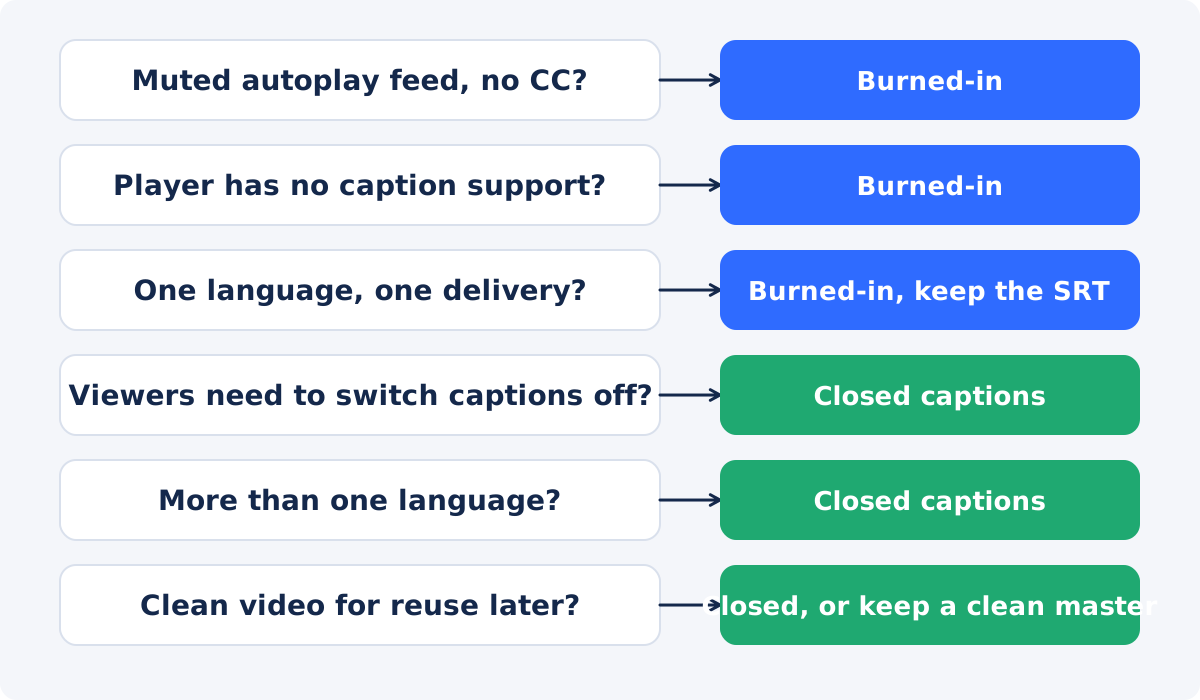
- Where will most viewers watch? A muted feed or a player without caption controls points to burned-in. A platform with a captions button points to closed captions, or both.
- Do viewers need to hide the text? If yes, closed captions.
- How many languages? One: either works. Several: closed captions, or burned-in only for the primary language.
- Does the text need to be enlarged or read by assistive technology? Closed captions, where the player supports them.
- Will the video be reused or re-edited? Keep a clean master and the SRT; burn in for each delivery.
- Is there a rule you must meet? Check the current requirement for your context before choosing.
- Is it a title or a caption? Titles go to Add Text; captions go to Add Subtitles.
Conclusion
Burned-in subtitles are certain and inflexible; closed captions are flexible and dependent on the player. Choose by the destination and the audience: burn in for muted feeds and unsupported players, use closed tracks where viewers can toggle and where languages multiply, and keep the SRT either way. The Deus.Video tool covers the burned-in side from lines you write or import, and the file you keep covers everything else.
Decided that the words need to show everywhere? Create timed subtitle lines in the Add Subtitles to Video tool, or import your SRT, and download the burned-in copy for delivery.
Frequently asked questions
Are subtitles and captions the same thing?
Not exactly. Captions are meant for viewers who cannot hear the audio and include sounds and speaker names; subtitles in the narrow sense show dialogue, often translated. In many places "subtitles" is used for both, so check what a platform or a client means by the word.
What does "open" and "closed" mean?
Open captions are always visible because they are part of the picture. Closed captions can be closed, that is, hidden, because they are a separate track the player draws on request.
Can viewers turn off burned-in subtitles?
No. They are pixels in the video. To offer a choice, keep a clean copy of the video and provide the captions as a separate track on a platform that supports it.
Does Deus.Video create closed captions?
The standalone tool does not. It renders the lines into the video. Keep your SRT for platforms that accept a caption track alongside the video.
Which is better for accessibility?
Closed captions, where the player supports them, because they can be enlarged, restyled, and read by assistive technology. Burned-in captions are the fallback where a track would not be shown. Requirements vary by context, so check the rules that apply to you.
Is a title added with Add Text a caption?
No. Titles, labels, and callouts are overlays timed to the edit, not to the speech. Captions represent the audio. Use Add Text for overlays and Add Subtitles for captions.